
Download Reasonable NoClone 2014 – duplicate file remover, disk space cleaner, file management tool, duplicate file finder, utility for cleaning up storage
Overview
Reasonable NoClone 2014 is a utility application designed to help users reclaim valuable disk space by identifying and removing duplicate files. The primary purpose of the app is to streamline file management on Windows systems by detecting redundant copies of documents, images, music, and other file types. This addresses a common challenge faced by users who accumulate multiple versions of the same file over time, leading to inefficient storage usage and cluttered directories. The target audience includes individuals and small teams managing personal or office computers where storage optimization is essential.
Although the app was released in 2014, it remains relevant for users seeking a lightweight, no-frills solution for disk cleanup. The developer, Reasonable Software, has positioned the tool as a straightforward file management utility without complex features or visual enhancements. Real-world use cases include freeing up space on aging hard drives, organizing media libraries, and reducing redundancy in backup folders. Despite its age, the app plays a niche role in the broader ecosystem of system maintenance tools, particularly for users who prioritize functionality over modern aesthetics.
The developer did not provide additional technical details about the app’s architecture or underlying algorithms. However, its continued availability suggests it maintains basic compatibility with current Windows systems. While no official updates have been released since its initial launch, the app continues to serve as a functional option for users seeking a free, dedicated duplicate file remover.
Key Features & Functionality
- Fast and Reliable Duplicate File Detection – NoClone performs rapid scans across selected drives and folders to identify files with identical content. This allows users to locate exact duplicates efficiently, especially in large file collections such as photo libraries or document archives.
- Flexible Search Options – Users can customize scans based on file name, content, or partial text matching. This adaptability enables targeted searches, such as finding duplicates across specific folders like Downloads or Documents, or filtering by file types like .jpg or .pdf.
- Automated Cleanup of Older Duplicates – The app supports automatic deletion of older versions of duplicate files, reducing manual effort. This feature is particularly useful for users managing version-controlled files or frequently backed-up documents.
- Save and Reuse Search Profiles – Users can store custom scan configurations for repeated use. This time-saving capability allows for consistent maintenance routines without reconfiguring settings each time.
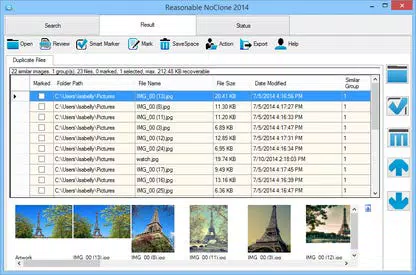
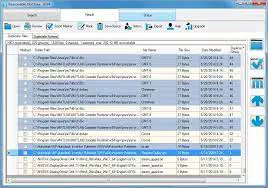
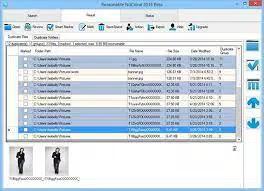
- Full-Screen Result Display – Search results are presented in full-screen mode, ensuring visibility of all detected duplicates. This layout helps users review and select files for deletion without interface clutter.
Each feature is designed to support practical file management workflows. For example, a user storing multiple versions of a project file can use the automated deletion function to keep only the latest version. Similarly, a photographer managing thousands of images can use the content-based scan to eliminate redundant copies across different folders.
Interface, UX & Performance
The user interface of Reasonable NoClone 2014 is described as simplistic and functional, with minimal visual design elements. The layout prioritizes utility over aesthetics, offering a straightforward navigation flow focused on scanning, reviewing results, and executing cleanup actions. Although the interface may appear dated, it ensures that core functions remain accessible without unnecessary complexity.
Navigating through the app involves selecting drives or folders, configuring search criteria, initiating a scan, and reviewing results. The full-screen display of findings enhances visibility, though it limits multitasking during the review process. The app’s responsiveness is consistent with its lightweight footprint of 3.1 MB, suggesting efficient memory usage.
Although the developer did not list formal performance metrics, the app’s small size and targeted functionality indicate stable operation on a range of Windows devices. It does not consume significant system resources during scans, making it suitable for use on older or low-spec machines. The lack of real-time feedback during scans may affect user experience, but the tool completes tasks reliably once initiated.
Platform Compatibility & Technical Requirements
Reasonable NoClone 2014 is designed for the Windows platform. The app supports the operating system version in use at the time of its release, though specific compatibility details were not provided. The file size is 3.1 MB, indicating a lightweight installation that requires minimal disk space.
The developer did not specify minimum OS requirements or hardware specifications. As such, compatibility with modern Windows versions (e.g., Windows 10 or 11) cannot be confirmed with certainty. However, the app’s small size and lack of dependencies suggest it may run on current systems with standard configurations.
Users should ensure they have administrative privileges to access system drives during scans. No information was provided about installation requirements, updates, or automatic backup features before deletion.
Pros and Cons
Pros
- Free to download and use, with no hidden costs or subscriptions.
- Lightweight at only 3.1 MB, making it suitable for low-resource systems.
- Fast duplicate detection with customizable scan options.
- Supports automated deletion of older duplicate files.
- Allows saving of search configurations for repeated use.
Cons
- Interface lacks visual polish and modern design elements.
- Full-screen result display limits multitasking during review.
- No built-in line-to-line comparison tool for similar files.
- App has not received updates since 2014; potential compatibility concerns with newer systems.
- Developer did not provide detailed technical documentation or support channels.
FAQ
Is Reasonable NoClone 2014 safe to use?
Yes, the app is free from malware and does not include harmful components. However, users should exercise caution when deleting files and ensure they are not essential to system operations or personal work.
Can I use NoClone on Windows 10 or Windows 11?
The developer did not specify compatibility with Windows 10 or 11. While the app may run on these systems due to its lightweight nature, no official confirmation was provided.
Does the app back up files before deletion?
No backup feature is mentioned in the available documentation. Users are advised to manually back up important files before initiating any deletion process.
Is there a mobile version of NoClone?
No, Reasonable NoClone 2014 is a desktop utility designed for Windows. There is no mobile version available for Android or iOS devices.
How often should I run the duplicate file scan?
Users can run the scan as needed, especially after large file transfers, system upgrades, or when noticing reduced disk space. Regular maintenance every few months is recommended for optimal storage management.
Final Thoughts
Reasonable NoClone 2014 remains a viable option for users seeking a no-cost, lightweight tool to manage duplicate files and reclaim disk space. While its interface is outdated and the app has not been updated in over a decade, its core functionality continues to deliver value for basic file cleanup tasks. The ability to customize scans, automate deletions, and save configurations makes it efficient for recurring maintenance.
It is best suited for users with older or low-spec systems who need a straightforward utility without unnecessary features. For those requiring advanced comparison tools or modern design, alternative solutions may be more appropriate. However, for simple, reliable duplicate file removal, NoClone delivers consistent results.
Download Reasonable NoClone 2014 now


